Occasions
An occasion is something that comes back every year on the same day: a birthday, a wedding anniversary, a day of remembrance or an occasion with your own name. Orbit shows it in the planner and on Today, and can remind you a few days before. Occasions belong to a space and follow its sharing: the people of the space see them, and only owners and editors can add, change or delete them.
Add an occasion
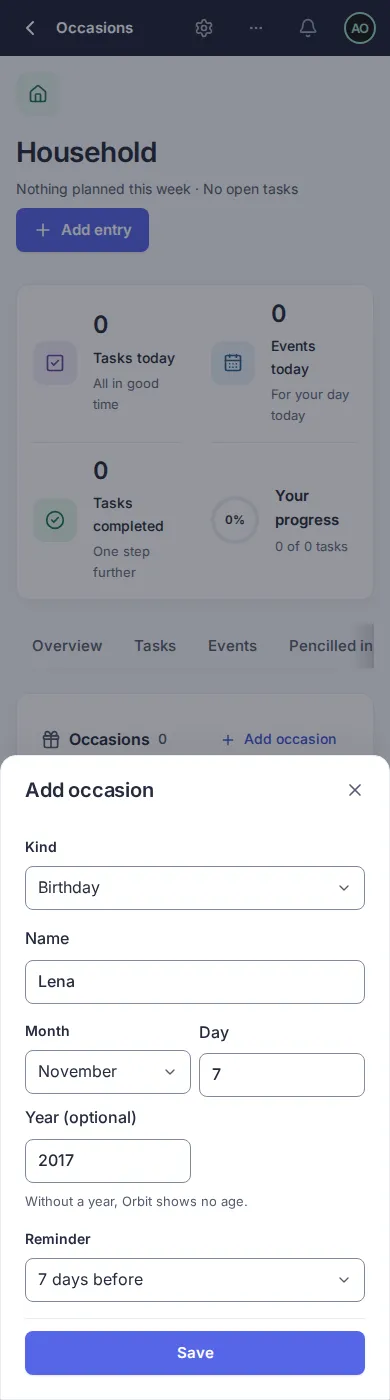
Section titled “Add an occasion”- Open the space and choose the tab Occasions.
- Choose Add occasion.
- Choose the kind and enter the name, for example “Lena”, or “Anna & Ben” for a wedding anniversary.
- Choose the month and enter the day. The year is optional: with the year Orbit shows the age, for example “Lena turns 9”; without it Orbit shows “Birthday of Lena”.
- Choose a Reminder if you want one, from “On the day” to “30 days before”.
- Choose Save.
An occasion on 29 February is shown on 28 February in years that are not leap years.
Where you see occasions
Section titled “Where you see occasions”- In the planner, in the week and the day view, on the day of the occasion, as a short note without a time. If you filter the planner by space, only the occasions of that space show; if you filter by person, occasions are hidden because they belong to a space.
- On Today, in the card for today’s events.
- In the Occasions tab of the space, as a list.
Reminders
Section titled “Reminders”A reminder is a notification on your devices at your morning time (the time of “Tasks due today” in your notification settings, 07:30 unless you changed it), the chosen number of days before the occasion. Only the person who set the reminder gets it. It shows the title, for example “Lena turns 9”, and the date. It needs notifications turned on for your device; see Reminders.
Change or delete
Section titled “Change or delete”Choose the pencil next to an occasion. Change the values and choose Save, or choose Delete occasion and confirm. If you only have the viewer role in the space, the sheet shows the occasion but you cannot change it.
Questions
Section titled “Questions”Why do I not see the age? You did not enter a year. Edit the occasion and add it.
Can I add an occasion for someone without an account? Yes, the name is only text.
Version 0.1.0+production