Today page
Today shows what needs you right now, on one page. Open it with Today in the navigation or with Open Today on the Dashboard. It is made for the phone but works on a tablet and a computer too. Today only shows what you may see in the spaces you belong to. A shared space you hid in Settings › Spaces hidden in the planner stays out of Today as well, as it does on the Dashboard.
What you see
Section titled “What you see”The page has five sections, always in the same order. A section without entries says so, so you know nothing is hidden. When nothing at all is planned for today, Add entry appears in the events section and opens the add panel for today. When no task is due, Add task appears in the tasks section and opens the form for a new task. An empty rides section explains that bring and pick-up are set on an event with a child and links to the guide.
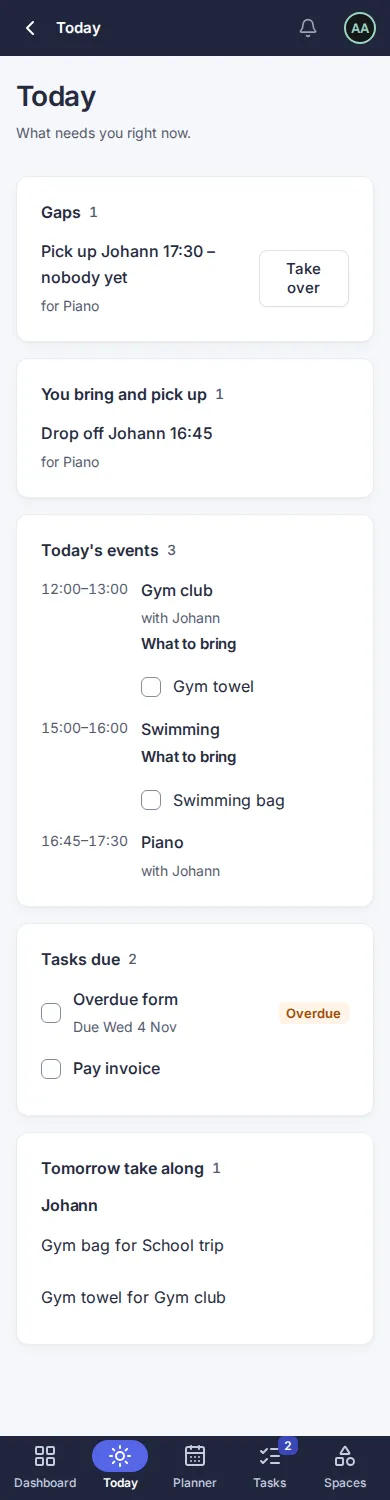
- Gaps: drop-offs and pick-ups of a child’s events today that nobody has taken yet, or where the person who took them is busy. A line reads, for example, “Pick up Johann 17:30 – nobody yet”. Owners and editors see Take over next to an open line. Choose it and the line moves to You bring and pick up.
- You bring and pick up: the drop-offs and pick-ups you are responsible for today, with the time.
- Today’s events: all-day events first (with the occasions of today, for example “Lena turns 9”), then by start time. If an event has a “What to bring” list, you see it here and can tick the items off.
- Tasks due: tasks due today and tasks that are overdue. Overdue tasks come first and carry the label Overdue and their due date. Tick a task to mark it done.
- Tomorrow take along: what to pack for tomorrow, grouped by child. Items you have already ticked are not listed.
Tick things off
Section titled “Tick things off”Tick an item or a task and it is saved at once; there is no save button. If the tick cannot be saved, for example because you have no network, the page shows a message and the box goes back to how it was. You can read Today offline, but you cannot change anything offline.
If you only have the viewer role in a space, you see its entries but cannot tick, complete or take over. You can tick items of your own events.
Open Today first on your phone
Section titled “Open Today first on your phone”- Open My Orbit › Settings.
- In the card Start page on phones, choose Today.
From then on, opening Orbit on a phone shows Today instead of the Dashboard. You can still reach the Dashboard from the navigation. Tablets and computers always open the Dashboard. The default is the Dashboard.
Questions
Section titled “Questions”Why is a drop-off missing from Gaps? Only events with a child are listed, and only when the slot is open or the person is busy at that time.
Why can I not tick an item? Owners and editors can tick every item. Others can tick the items of events they or their children take part in.
Which day is “today”? The day in your time zone, set in your settings.
Version 0.1.0+production